
Infinity Game Table Board Game Review

The Infinity Game Table is a digital tabletop console made by Arcade1Up, first released in 2021. It replaces shelves of physical board game boxes with a single HD touchscreen surface that loads official digital versions of classic titles. Available in 24-inch and 32-inch models, it supports 1 to 6 players, carries an Everyone 10+ rating, and runs game sessions ranging from 5 minutes to well over an hour depending on the title. This review covers the 32-inch model and breaks down what works, what doesn’t, and who should consider buying one.
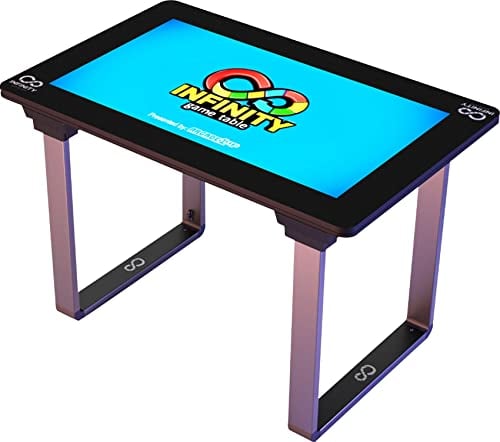
Infinity Game Table Overview
The concept is straightforward: a flat touchscreen table preloaded with digital board games, card games, puzzles, and activities. You tap, swipe, and drag pieces on the screen the same way you’d handle physical components, except the table handles setup, rule enforcement, and cleanup automatically.
The table ships with around 40 preloaded titles, mostly licensed Hasbro games. An online store accessible through the built-in Wi-Fi connection adds over 100 more titles, split between free downloads and paid options. Game categories span family board games, card games, puzzles, digital coloring books, and comic books.
| Specification | Details |
|---|---|
| Manufacturer | Arcade1Up |
| Year Released | 2021 |
| Screen Size | 32″ HD (1920 x 1080) |
| Players | 1–6 (local or online) |
| Age Range | Everyone 10+ |
| Playing Time | Varies by game (5–90+ minutes) |
| Category | Digital Tabletop Console |
| Connectivity | Wi-Fi (2.4GHz), Social Play+ |
| Storage | 16GB + microSD card slot |
| Refresh Rate | 60Hz |
What’s in the Infinity Game Table Box
Assembly takes under ten minutes. The table arrives partially assembled, and attaching the four legs is the only real work involved.
| Component | Notes |
|---|---|
| 32″ HD touchscreen panel | Spill-resistant surface, responsive to multi-touch input |
| 4 detachable legs | Remove them to lay the table flat on another surface or the floor |
| Power cable and AC adapter | Requires a wall outlet; no built-in battery (battery pack sold separately) |
| Game blocker shields (set of 6) | Physical dividers that stand on the screen to hide cards from other players |
| Coasters | Placed on the screen edges to hold drinks safely |
| Cleaning cloth | Microfiber wipe for fingerprints and smudges |
| User manual | Setup and registration instructions |
The screen is sturdy enough for everyday use. Arcade1Up designed it to handle minor spills and the general wear of hands resting and tapping on it during extended sessions. Two USB ports and a microSD card slot sit along the edge for storage expansion.
Infinity Game Table Pros and Cons
Pros
- Eliminates setup and cleanup time entirely. The table handles shuffling, dealing, banking, and scorekeeping on its own.
- 40+ preloaded games with 100+ more available through the online store, covering a wide range of ages and complexity levels.
- Online multiplayer through Social Play+ lets you connect with up to 6 players remotely, which keeps the table useful even when nobody can visit in person.
- Dynamic zoom automatically adjusts each player’s viewing angle so nobody reads cards upside down.
- Haptic feedback on dice rolls, card flips, and game events adds a physical sense of interaction to the touchscreen.
- Save-and-resume feature lets you pause mid-game and pick it up later, something physical board games can’t easily match.
Cons
- The game library grows slowly. User reviews frequently mention long gaps between new title releases.
- Requires a power outlet at all times unless you buy the separate rechargeable battery pack (which provides roughly 4–4.5 hours of use).
- Premium games cost extra beyond the preloaded selection. Titles like Ticket to Ride and Pandemic carry one-time fees.
- The table takes up real space in your home, roughly the footprint of a coffee table, and at its price point that’s a serious commitment.
- Wi-Fi setup can be tricky on first boot. Some users report needing a factory reset to get past the initial connection loop.
How to Play Games on the Infinity Game Table
Initial Setup
Plug the table into a power outlet and press the power button. On first boot, it connects to your Wi-Fi network and asks you to create an account. Registration takes a couple of minutes. After that, you see the main dashboard with your preloaded games ready to go.
Choosing and Starting a Game
Browse your installed games or open the online store to download new ones. Tap a game icon, select the number of players, and the table handles all the setup: shuffling decks, distributing starting resources, laying out the board. Players sit around the table like a traditional board game session.
During Play
Each game follows its own rules, but the interface stays consistent. You tap to select, drag to move, and swipe to scroll through hands of cards. The dynamic zoom feature shifts the view to whichever player’s turn it is, rotating the board so the active player always sees their perspective right-side up. Haptic feedback pulses through the screen surface on key actions.
Saving and Resuming
If you need to stop mid-game, exit to the main menu and select your saved game later to resume where you left off. The table stores your progress locally.
Where to Buy the Infinity Game Table
| Retailer | Product | Notes |
|---|---|---|
| Infinity Game Table (Official Site) | 32″ Game Table, 18.5″ Game Board | Full game library access and product info |
| Best Buy | 32″ Game Table | In-store pickup and customer reviews available |
| Amazon | 32″ Game Table + accessories | Battery pack and screen protectors also available |
| Walmart | 32″ Game Table | 4.6-star rating from 8,000+ reviews |
| Wayfair | 32″ Game Table | Financing options available |
| Home Depot | 32″ Game Table | Priced at $949.99; includes riser and stool bundle |
The compact Infinity Game Board (18.5-inch screen, $499.99 MSRP) is also available through the official site and Best Buy for those who want the same library in a more portable form.
Infinity Game Table Game Mechanics and Features
The Infinity Game Table doesn’t introduce new board game mechanics. Instead, it digitizes existing ones. Monopoly still uses dice rolls and property trading. Scrabble still has tile placement and word scoring. The table automates the parts of these games that slow things down in their physical versions: shuffling cards, counting money, tracking scores.
Where the table adds something new is in presentation. The dynamic zoom feature keeps the board oriented toward the active player, so nobody plays upside down. Haptic sensors beneath the screen surface give a light vibration on dice rolls and card flips. These are small touches, but they address the biggest complaint about digital board game adaptations: the loss of tactile interaction.
Online play through Social Play+ works like a simplified matchmaking system. You connect your table to another player’s table over Wi-Fi, and up to 6 people can join a single session remotely. A friends list lets you invite specific people. For families spread across different locations, this is the feature that justifies the price for many buyers.
Who Should Play on the Infinity Game Table
The Infinity Game Table fits families with kids aged 10 and up who regularly have game nights but are tired of digging through closets for boxes, sorting pieces, and reading rule books. If your household already plays Monopoly, Sorry, and Scrabble on a regular rotation, this table consolidates everything into one spot and removes the friction of setup.
It also works well for grandparents or extended family who want to play remotely. The Social Play+ feature is simple enough for non-technical users to figure out, and the game interfaces are large and readable on the 32-inch screen.
This table is not aimed at hobby gamers who prefer complex strategy games with deep decision trees. The library leans heavily toward mass-market Hasbro titles and casual games. If you’re looking for cooperative board games like Pandemic or Spirit Island in their full tabletop form, you’ll find more depth in the physical versions or their standalone app adaptations. Pandemic is available on the Infinity Game Table store, but the library doesn’t go much deeper than that.
Skip this if you live in a small apartment with no room for a dedicated game surface, or if you only play board games a few times a year. The price-per-session math only works out if the table sees regular use.
FAQ
Is the Infinity Game Table good for beginners?
Yes. Every game includes built-in tutorials and rule enforcement, so players can learn as they go without reading a physical rulebook. The touchscreen interface is intuitive, and most preloaded games are family-friendly titles with simple rules. Kids as young as 10 can pick it up quickly.
How long does an Infinity Game Table session take?
Session length depends entirely on the game you pick. A round of Connect 4 takes a few minutes. A full game of Monopoly can run over an hour. Quick-play options like Checkers or Solitaire work for short bursts, while deeper games like Trivial Pursuit fill a whole evening.
What is the best way to use the Infinity Game Table?
The 32-inch model works best with 3 to 4 players seated around it, though it supports up to 6. The screen is large enough for everyone to see clearly at that count. For two-player sessions, the 18.5-inch Game Board is a cheaper and more portable option worth considering.
Is the Infinity Game Table worth buying?
If your household plays board games at least weekly and you value the convenience of automated setup and cleanup, it pays for itself in time saved and shelf space reclaimed. For occasional players, the price is hard to justify when individual board game apps cost a fraction of the table’s price.
What games are similar to the Infinity Game Table experience?
Board game apps on tablets like Monopoly, Catan, and Ticket to Ride offer similar digital experiences on a smaller screen. The shift toward digital board gaming means many classic titles now have standalone app versions for phones and tablets at far lower cost.
