What is Kiddle co?

Every so often a story circulates claiming Google launched a junior edition of its search tool called Kiddle. Newsrooms have run with it. The claim is wrong.
Kiddle.co registered its domain in 2014 and has been mistaken for a Google product ever since. Here is what actually sits behind the name, and where it falls short.
What Is Kiddle Co and Who Runs It
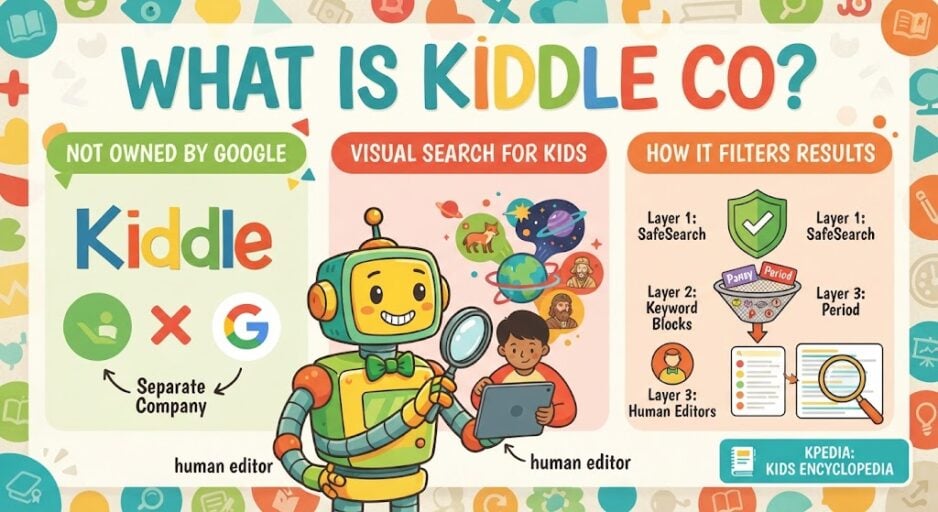
Kiddle is a visual search engine built for children. Google did not create it and does not own it. An unrelated company operates the site.
Queries pass through Google Programmable Search with SafeSearch switched on. Editors then sit on top of that, striking out wording the team judges unsuitable for young users. The .co ending was picked to signal “children only”.
The site also runs its own encyclopedia, Kpedia, holding roughly 700,000 articles rewritten from Wikipedia in simpler language. A Spanish edition arrived in July 2023, and the homepage logo was redrawn in September 2025.
| Widely held belief | The actual position |
|---|---|
| Google built and runs it | An outside company operates it |
| It uses its own web index | Queries run through Google Programmable Search |
| Screening happens by machine alone | Paid reviewers also vet wording |
How Kiddle Co Filters Search Results
Three layers do the work. Blocked keywords and blocked sites come first, which is why YouTube, Instagram, TikTok and WhatsApp return nothing.
SafeSearch strips explicit pages second. Human editors handle the third layer, and their vetting only reaches so far down the page.
Does Kiddle Co Deliver Tamer Results Than Google
That hinges on your definition of tamer. Search a famous name such as Miley Cyrus or Kim Kardashian and the pages returned are far less racy than the standard set.
Ask about “meow meow” and you get cat photos rather than notes on the drug carrying that nickname. Families weighing offline options for the same age group can browse this list of cooperative games picked for younger players.
The gaps show up fast, though. Testing by SlashGear found “fastest motorbike” returned nothing, and “Ho Chi Minh City” triggered an error page.
Why Kiddle Co Blocks Ordinary Words
The blocking side has annoyed people. Some words never reach a result page at all. Instead you are told off.
| Type of query | Notice displayed |
|---|---|
| Wording flagged as offensive | Oops, it looks like your query contained some bad words. Please try again! |
| Wording softened after early criticism | Sorry, can’t help you with this query. Please try again! |
Shortly after launch, coverage noted that gay, lesbian and heterosexual all fell into the harsher category. That phrasing was later adjusted to the gentler notice.
Words like pussy, pansy and menstruation still drew the tougher one, while tampons went through untouched. Then there is “period”, which shows how odd the screening can look.
| Typed into | Leading results |
|---|---|
| Kiddle | Eras from history and the table of chemical elements |
| A National Health Service page explaining monthly bleeding |
Pre-teens hunting for that second answer will not find it here. Homework queries hit the same wall, with search terms like “biophilic design” and “HTML language” turning up little of use.
Should Families Rely on Kiddle Co
No screening layer is watertight, and that is the core snag. Someone decided pansy counts as rude, although it is an ordinary word that bullies happen to borrow.
You cannot promise a youngster will never stumble onto pages you would rather they skipped, and you may equally find useful material walled off for no good reason. Privacy is a mixed picture too: Kiddle says it collects no personally identifiable data and wipes server logs daily, yet the site still serves Google ads.
Age comes into it as well. By around seven, most children spot from the styling alone that this is not the thing adults use, and few enjoy being handed what looks like a toddler’s version.
Parents watching that shift often start looking at board game picks aimed at tweens or these recommendations for ten-year-olds. With the youngest group, an adult usually sits beside them while they browse anyway, which does more good than any filter.
Kids who mainly want harmless fun on Google itself can be pointed at hidden Google Easter eggs instead, from the backwards Google Mirror page to the flooded search screen.
The Short Answer on Kiddle Co
Flicking on a filter will not teach a youngster how to use the web sensibly. Neither will handing that job to reviewers whose values might sit nowhere near your own.
It takes real hours from adults at home or in the classroom, plus a dose of common sense from the child, before this enormous library becomes something they can use well and use safely. The same argument comes up with augmented reality toys for children, and it applies just as much to the games families play together away from a screen.
FAQs
Is Kiddle owned by Google?
No. Kiddle is run by a separate company. It uses Google Programmable Search and SafeSearch to generate results, but Google has no ownership stake in the site and did not build it.
Is Kiddle co safe for young children?
Kiddle blocks explicit keywords, bans social platforms and has editors vet the top results. No filter catches everything, so adult supervision still matters, especially for children under seven.
What is Kpedia on Kiddle?
Kpedia is Kiddle’s own encyclopedia, holding around 700,000 articles adapted from Wikipedia and rewritten in simpler language for school research and homework help.
Why does Kiddle block ordinary words?
Keyword screening flags terms that also appear in adult contexts. Words such as pansy and menstruation have been blocked, which walls off legitimate health and biology searches for older children.
How do I make Kiddle the default search engine?
In Chrome on desktop, open Settings, choose Search engine, add a site search using https://www.kiddle.co/s.php?q=%s, then set it as default. On mobile, visit kiddle.co three times first.
